This quote hit hard : "Nobody wants to read something that you didn’t bother writing."
also : "Artisanal, hand made slop"
Not your average LI slop:
personal Brain Dump, books, Machine Learning, Deep Learning, Computer Vision, Mathematics
It's been a long time since i posted here.
We have moved to the agentic era, a new shitstorm of bad software is coming online.
Software that is sloppy, brittle and unrefined.
The main culprit of fragility at this current period is the agentic part.
Your agent has one version number and four things that decide what it actually does.
> Ship a change to the orchestration code, tag it, done. That covers one of the four.
>> The instructions and policy block is the second. Also yours, also the one everyone treats as the whole system, right up until the third and fourth parts move without telling you.
>> The model runtime is the third. A vendor's pinned snapshot, sitting in Active, Legacy, Deprecated, or Retired, on that vendor's own lifecycle, with a minimum notice period before it goes away. Anthropic's is 60 days. That is one company's policy. It binds nobody else's model, and it does not ask what your regression suite thinks.
>>> The fourth is the protocol and tools your agent calls out through. MCP now stamps a dated version string on every single request, which is more discipline than most teams manage on their own code. The tool schemas sitting behind that protocol still version on their own schedule, with no such stamp, and no one upstream is watching your integration tests when they change.
Most teams have a git log for the first two and nothing for the last two, then act surprised when the agent that passed every eval last month answers differently this month with no local commit to blame.
I put the rest of it in the attached deck: the release pipeline for a system that cannot be tested to certainty, what decides whether a rollback is even possible, and the four OWASP agentic-risk entries that are this problem read as a containment question.
Presentation here: https://drive.google.com/file/d/1rAghJ-Wcp57gFey1caBpA8xKWenz28eB/view?usp=drive_link
Tensorflow / Keras threshold operations break the gradient flow.
There is a way to fix this by using a combination of operations.
def threshold_min_max_value(input_layer,
min_value=0.0,
max_value=1.0):
"""
Thresholds all the values of the a tensor that exceed value to that
max_value, and than are lower than the min_value,
this layer retains gradient flow
:param input_layer: the input layer
:param min_value: minimum value to threshold to
:param max_value: maximum value to threshold to
:return: threshold-ed input layer
"""
def _threshold(_x):
ge_max_value = K.greater_equal(_x, max_value)
ge_max_value = K.cast_to_floatx(ge_max_value)
lt_max_value = 1.0 - ge_max_value
le_min_value = K.less_equal(_x, min_value)
le_min_value = K.cast_to_floatx(le_min_value)
gt_min_value = 1.0 - le_min_value
tmp0 = keras.layers.Multiply()([
lt_max_value, gt_min_value, _x
])
return tmp0 + (min_value * le_min_value) + (max_value * ge_max_value)
return keras.layers.Lambda(_threshold)(input_layer)

The model_lib_tf2.py file contains all the training and evaluation loops.
In the function:
def eager_train_step(detection_model,
features,
labels,
unpad_groundtruth_tensors,
optimizer,
learning_rate,
add_regularization_loss=True,
clip_gradients_value=None,
global_step=None,
num_replicas=1.0):
We can see that every training iteration it saves a few training dataset images.
tf.compat.v2.summary.image(
name='train_input_images',
step=global_step,
data=features[fields.InputDataFields.image],
max_outputs=5)
There are three problems with this:
1. It takes A LOT of space
2. It actually slows up training
3. Images look saturated.
We can fix this easily by replacing the above snippet with this:
if global_step % 100 == 0:
# --- get images and normalize them
images_normalized = \
(features[fields.InputDataFields.image] + 128.0) / 255.0
tf.compat.v2.summary.image(
name='train_input_images',
step=global_step,
data=images_normalized,
max_outputs=5)

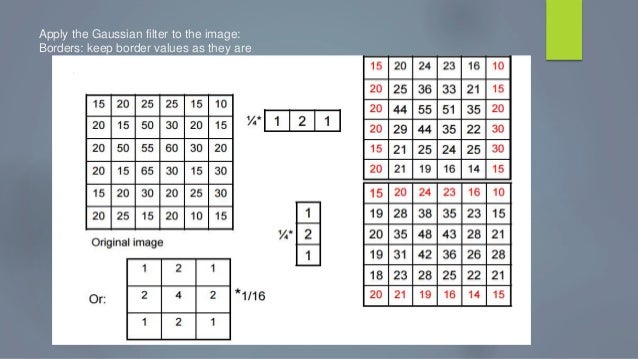
Very often we need to perform basic vision operations on a computational graph like building a Laplacian pyramid or filter a tensor with a specific precalculated filter.
Below i present a code snippet for building a fixed non-trainable gaussian filter in keras.
import keras
import numpy as np
import scipy.stats as st
def gaussian_filter_block(input_layer,
kernel_size=3,
strides=(1, 1),
dilation_rate=(1, 1),
padding="same",
activation=None,
trainable=False,
use_bias=False):
"""
Build a gaussian filter block
:return:
"""
def _gaussian_kernel(kernlen=[21, 21], nsig=[3, 3]):
"""
Returns a 2D Gaussian kernel array
"""
assert len(nsig) == 2
assert len(kernlen) == 2
kern1d = []
for i in range(2):
interval = (2 * nsig[i] + 1.) / (kernlen[i])
x = np.linspace(-nsig[i] - interval / 2., nsig[i] + interval / 2.,
kernlen[i] + 1)
kern1d.append(np.diff(st.norm.cdf(x)))
kernel_raw = np.sqrt(np.outer(kern1d[0], kern1d[1]))
# divide by sum so they all add up to 1
kernel = kernel_raw / kernel_raw.sum()
return kernel
# Initialise to set kernel to required value
def kernel_init(shape, dtype):
kernel = np.zeros(shape)
kernel[:, :, 0, 0] = _gaussian_kernel([shape[0], shape[1]])
return kernel
return keras.layers.DepthwiseConv2D(
kernel_size=kernel_size,
strides=strides,
padding=padding,
depth_multiplier=1,
dilation_rate=dilation_rate,
activation=activation,
use_bias=use_bias,
trainable=trainable,
depthwise_initializer=kernel_init,
kernel_initializer=kernel_init)(input_layer)
from my open source project https://github.com/NikolasMarkou/multiscale_variational_autoencoder
To test tf2onnx changes with different operators set your external variable prior to calling pytest.
So for example in a windows setup this will run the tests
set TF2ONNX_TEST_OPSET=11
pytest
and in a standard linux setup
export TF2ONNX_TEST_OPSET=11

cmake ../ -DHAVE_MKL=ON -DBUILD_opencv_python2=OFF -DBUILD_opencv_java=OFF -DMKL_WITH_TBB=ON -DWITH_OPENCL=ON -DWITH_CUDA=ON -DWITH_CUBLAS=ON -DENABLE_CXX11=ON -DOPENCV_EXTRA_MODULES_PATH=/home/arxwn/Repositories/opencv/opencv_contrib/modules -DCPU_BASELINE="SSE3" -DCPU_DISPATCH="SSE4_1;SSE4_2;AVX;FP16;AVX2;AVX512_SKX" -DOPENCV_ENABLE_NONFREE=ON

from keras.preprocessing import image as image_utils
ImportError: No module named keras.preprocessing
To fix this you you just need to install the following packages prior to compiling
pip install keras_applications==1.0.4 --no-deps
pip install keras_preprocessing==1.0.2 --no-deps
pip install h5py==2.8.0
And that's it you can build again.