Showing posts with label tensorflow. Show all posts

Monday, January 18, 2021

Keras/Tensorflow threshold with gradient flow

Tensorflow / Keras threshold operations break the gradient flow.

There is a way to fix this by using a combination of operations.

def threshold_min_max_value(input_layer,
min_value=0.0,
max_value=1.0):
"""
Thresholds all the values of the a tensor that exceed value to that
max_value, and than are lower than the min_value,
this layer retains gradient flow

:param input_layer: the input layer
:param min_value: minimum value to threshold to
:param max_value: maximum value to threshold to
:return: threshold-ed input layer
"""

def _threshold(_x):
ge_max_value = K.greater_equal(_x, max_value)
ge_max_value = K.cast_to_floatx(ge_max_value)
lt_max_value = 1.0 - ge_max_value

le_min_value = K.less_equal(_x, min_value)
le_min_value = K.cast_to_floatx(le_min_value)
gt_min_value = 1.0 - le_min_value

tmp0 = keras.layers.Multiply()([
lt_max_value, gt_min_value, _x
])
return tmp0 + (min_value * le_min_value) + (max_value * ge_max_value)

return keras.layers.Lambda(_threshold)(input_layer)


Deep Learning LSTM for Sentiment Analysis in Tensorflow with Keras API -  DEV Community


Thursday, December 24, 2020

Fix Tensorflow Object Detection Framework taking too much disk space while training

The model_lib_tf2.py file contains all the training and evaluation loops.

In the function:

def eager_train_step(detection_model,
features,
labels,
unpad_groundtruth_tensors,
optimizer,
learning_rate,
add_regularization_loss=True,
clip_gradients_value=None,
global_step=None,
num_replicas=1.0):

We can see that every training iteration it saves a few training dataset images.

tf.compat.v2.summary.image(
name='train_input_images',
step=global_step,
data=features[fields.InputDataFields.image],
max_outputs=5)

There are three problems with this:

1. It takes A LOT of space

2. It actually slows up training 

3. Images look saturated.

We can fix this easily by replacing the above snippet with this:

if global_step % 100 == 0:
# --- get images and normalize them
images_normalized = \
(features[fields.InputDataFields.image] + 128.0) / 255.0
tf.compat.v2.summary.image(
name='train_input_images',
step=global_step,
data=images_normalized,
max_outputs=5)

 Everything you need to know about TensorFlow 2.0 | Hacker Noon


Monday, October 12, 2020

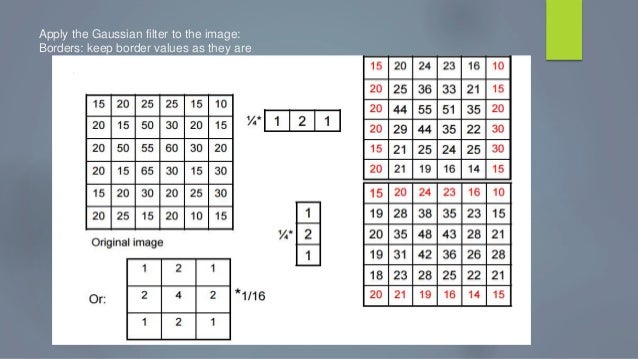
Gaussian Filter in Keras (code snippet)

Very often we need to perform basic vision operations on a computational graph like building a Laplacian pyramid or filter a tensor with a specific precalculated filter. 

Below i present a code snippet for building a fixed non-trainable gaussian filter in keras.

import keras
import numpy as np
import scipy.stats as st

def gaussian_filter_block(input_layer,
kernel_size=3,
strides=(1, 1),
dilation_rate=(1, 1),
padding="same",
activation=None,
trainable=False,
use_bias=False):
"""
Build a gaussian filter block
:return:
"""

def _gaussian_kernel(kernlen=[21, 21], nsig=[3, 3]):
"""
Returns a 2D Gaussian kernel array
"""
assert len(nsig) == 2
assert len(kernlen) == 2
kern1d = []
for i in range(2):
interval = (2 * nsig[i] + 1.) / (kernlen[i])
x = np.linspace(-nsig[i] - interval / 2., nsig[i] + interval / 2.,
kernlen[i] + 1)
kern1d.append(np.diff(st.norm.cdf(x)))

kernel_raw = np.sqrt(np.outer(kern1d[0], kern1d[1]))
# divide by sum so they all add up to 1
kernel = kernel_raw / kernel_raw.sum()
return kernel

# Initialise to set kernel to required value
def kernel_init(shape, dtype):
kernel = np.zeros(shape)
kernel[:, :, 0, 0] = _gaussian_kernel([shape[0], shape[1]])
return kernel

return keras.layers.DepthwiseConv2D(
kernel_size=kernel_size,
strides=strides,
padding=padding,
depth_multiplier=1,
dilation_rate=dilation_rate,
activation=activation,
use_bias=use_bias,
trainable=trainable,
depthwise_initializer=kernel_init,
kernel_initializer=kernel_init)(input_layer)

from my open source project https://github.com/NikolasMarkou/multiscale_variational_autoencoder

gaussian filter seminar ppt

Monday, August 24, 2020

Tensorflow to Onnx (tf2onnx) testing with different opsets

To test tf2onnx changes with different operators set your external variable prior to calling pytest.

So for example in a windows setup this will run the tests

set TF2ONNX_TEST_OPSET=11

pytest

and in a standard linux setup

export TF2ONNX_TEST_OPSET=11

pytest


Contribute to the Open Neural Network eXchange (ONNX) | by Svetlana Levitan  | Center for Open Source Data and AI Technologies | Medium

Monday, March 23, 2020

Compiling Tensorflow 1.15 from source


Αποτέλεσμα εικόνας για tensorflow
Following my previous post Compiling Tensorflow under Debian Linux with GPU support and CPU extensions I was trying to build version r1.15 when i stumbled to another peculiar bug. When reaching the end of the compilation you get a lovely error in the form of

from keras.preprocessing import image as image_utils
ImportError: No module named keras.preprocessing
 
To fix this you you just need to install the following packages prior to compiling

pip install keras_applications==1.0.4 --no-deps
pip install keras_preprocessing==1.0.2 --no-deps
pip install h5py==2.8.0
 
And that's it you can build again.


bazel build -c opt --config=v1 --copt=-mavx --copt=-mavx2 --copt=-mfma --copt=-mfpmath=both --copt=-msse4.2 --config=opt --config=cuda //tensorflow/tools/pip_package:build_pip_package

Monday, January 20, 2020

What if you could push your AI models to be 10 times faster?

Deceptive Easy

Modern Machine Learning (ML) and especially Deep Learning (DL) have become deceptively easy. It is almost trivial to have something up and running with presentable results as the the tools hide most of the complexity and hard decisions. Whereas that might be good enough for a Proof of Concept (POC) or a Minimum Viable Product (MVP), ensuring stability, high performance and scalability is a whole different ball game.

High Sunk Cost 

Many CXO’s and seniors managers find themselves trapped into subpar solutions that cannot be used effectively because they lack the technical know-how to productionalize them.

At Electi we have just release a new brochure listing the services we can offer to companies already implementing Deep Learning. Check it out here.


Thursday, July 12, 2018

Visualizing frozen models in tensorflow and tensorboard

In tensorflow frozen inference graphs are normal graphs with their variables turned to constants and some training layers stripped away. Very often we get these binary files in protobuf (pb) and we want to check them out.

A fast way to do it is by using tensorboard and the tensorflow tool called import_pb_to_tensorboard.py

To use you need to clone the tensorflow repo locally.

First you convert the model into tensorboard event log


 python ~/tensorflow/tensorflow/python/tools/import_pb_to_tensorboard.py --model_dir PATH_TO_PB_FILE --log_dir PATH_LOG_DIR

afterwards you run tensorboard to visualize it


tensorboard --logdir=visualization:PATH_TO_LOG_DIR


Wednesday, January 10, 2018

Compiling Tensorflow under Debian Linux with GPU support and CPU extensions


Tensorflow is a wonderful tool for Differentiable Neural Computing (DNC) and has enjoyed great success and market share in the Deep Learning arena. We usually use it with python in a prebuild fashion using Anaconda or pip repositories. What we miss that way is the chance to enable optimizations to better use our processing capabilities as well as do some lower level computing using C/C++.

The purpose of this post is to be a guide for compiling Tensorflow r1.4 on Linux with CUDA GPU support and the high performance AVX and SSE CPU extensions.

This guide is largely based on the official Tensorflow Guide and this snippet with some bug fixes from my side.

1. Install python adependencies:


sudo apt-get install python-numpy python-dev python-pip python-wheel python-setuptools

2. Install GPU prerequisites:
  • CUDA developer and drivers
  • CUDNN developer and runtime
  • CUBLAS
Make sure cuddn libs are copied inside the cuda/lib64 directory usually found under /usr/local/cuda.


sudo apt-get install libcupti-dev

3. Install Bazel google's custom build tool:


sudo apt-get install openjdk-8-jdk

echo "deb [arch=amd64] http://storage.googleapis.com/bazel-apt stable jdk1.8" | sudo tee /etc/apt/sources.list.d/bazel.list

curl https://bazel.build/bazel-release.pub.gpg | sudo apt-key add -

sudo apt-get update && sudo apt-get install bazel

sudo apt-get upgrade bazel


4. Configure Tensorflow:


git clone https://github.com/tensorflow/tensorflow

cd tensorflow

git checkout r1.4

## don't use clang for nvcc backend [https://github.com/tensorflow/tensorflow/issues/11807] 
## when asked for the path to the gcc compiler, make sure it points to a version <= 5 
./configure


5. Compile with the SSE and AVX flags and install using pip:


# set locale to en_us [https://github.com/tensorflow/tensorflow/issues/36]

export LC_ALL=en_us.UTF-8

export LANG=en_us.UTF-8

bazel build -c opt --copt=-mavx --copt=-mavx2 --copt=-mfma --copt=-mfpmath=both --copt=-msse4.2 --incompatible_load_argument_is_label=false --config=opt --config=cuda //tensorflow/tools/pip_package:build_pip_package

./bazel-bin/tensorflow/tools/pip_package/build_pip_package /tmp/tensorflow_pkg

sudo pip install /tmp/tensorflow_pkg/tensorflow-1.4.1*


If you get a nasm broken link error :
edit  tensorflow/tensorflow/workspace.bzl and add an extra link

urls = [
          "https://mirror.bazel.build/www.nasm.us/pub/nasm/releasebuilds/2.12.02/nasm-2.12.02.tar.bz2",  
          "http://www.nasm.us/pub/nasm/releasebuilds/2.12.02/nasm-2.12.02.tar.bz2",
          "http://pkgs.fedoraproject.org/repo/pkgs/nasm/nasm-2.12.02.tar.bz2/d15843c3fb7db39af80571ee27ec6fad/nasm-2.12.02.tar.bz2",
      ]


6. Test that everything works:


cd ~/

python

>>> import tensorflow as tf

>>> session = tf.InteractiveSession()
>>> init = tf.global_variables_initializer()
## At this point if your get a malloc.c assertion failure, it is due to a wrong CUDA configuration (ie not using the runtime version)

At this point there should not be any CPU warning and the GPU should be initialized.